
First, let me answer the number one question about research
papers:
Yes, you should be worried. If you are not worried about your research
paper, you will not do a good job of it. The purpose of the research paper
is to prepare you for the papers will have in college. On this site, you
will find due dates and guidelines.
FOLLOW ALL GUIDELINES AND MEET ALL DEADLINES!
You will also find help for most of your needs. If you have additional
questions, please e-mail
me.
Too much information? Follow the STEP BY STEP GUIDE.

Your topic can be anything that can be argued. Here are some links that will give you some ideas, but you can go in any direction you wish.
Follow these guidelines and stop accidental plagiarism before it can begin.
Part III - Putting your house in order
Now you've finished note taking - here is how to slug your cards and write a thesis statement.
How to write the introduction, the conclusion, transistion sentences, follow formal rules, and how to cite your sources in the paper.
Part V - So I finished my paper - now what?
Think you are finished? No you're not! Use these online proofreaders, clean up your in-text, check that works cite page.
Part VI - Submitting the paper
Here is how you turn it in.
DEADLINES
Wed 4/6 – Blank note cards (100 cards at least)
Thurs 4/7 – 10 note cards filled out (not including source cards)
Fri 4/8 – 25 note cards filled out (not including source cards) (grade weighted 1.5)
Mon 4/11 - 40 note cards filled out (not including source cards) (grade weighted twice)
Tues 4/12 – 50 note cards filled out (not including source cards) (grade weighted twice)
Wed 4/13– Bring in all source cards (must be at least six) and all note cards
Thurs 4/14 – Thesis statement (grade weighted twice)
Wed 4/20– Bring in Rough Draft (at least 1 page typed) - In-Text Check
Fri 4/22 – Bring in Rough Draft (at least 2 pages typed) (grade weighted twice)
Wed 4/27 – Bring in Rough Draft (at least 4 pages typed) (grade weighted twice)
Thurs 4/28 – Paperrater Check & Recheck (grade weighted twice)
Fri 4/29 – Works Cited Page
Monday 5/2– Research Paper
due
NOTE - The final due date is regardless of your attendance on that day. If you are absent and turn it in the next day, it is still one day late.
Deadline Grades:
100 for each made deadline
0 for each missed deadline (no late grades)
Exempt for anyone absent on day of deadline
Part I - Picking a topic
You will pick a topic that can be argued. You will choose one side of the issue and convince me that your side is the correct one. I do not want both pros and cons. Just one side is fine. We are not FOX News so there is no need to be fair and balanced.
You can use these sites to maybe get you thinking about possible controversial topics:
Sources
Must have 6 sources total. You may have more.

Part II - Taking Notes
USE THIS PRESENTATION (put in PRESENT mode)
You will need approximately 10 note cards x the number of pages required for your paper. Then add about 15 to it because many of the first cards will not work well into your paper.
What do you need?
- source cards - these cards will have the MLA of your source. You will write a letter at the top of this card (a different letter for each source). This is called a source code. You need to have at least six sources. It is helpful to have these cards look different from your note cards
- note cards - these cards will have one piece of information or one quote. In the top right hand corner, put the same letter that you have on the source card for that source. This way you will know where this note came from later. If your source has a page number (book, magazine, database, etc.) then you must put the page number of that source under the source code.This handout shows you what it looks like.
- time - expect it to take around one hour to get ten note cards at first.This, of course, depends on several variables, but it is a good standard to use.
- the ability to paraphrase so that you are not just copying from your source. Try this handout.
Paraphrasing Practice:
- Practice A - Space Invaders
- Practice B - The Men Who Created Spider-Man
- Practice C - Orion (Extra Credit - worth 2 Classwork grades)
Here are some links to help you research -
- OHS Library Book Search
- Google Scholar - searches only more academic sites, not some kid's middle school project or other useless stuff
- Microsoft Academic - searches only more academic sites
- iSeek - created for students to use for researching
- The Sweet Search - another great search engine that filters out bad material.
- Bing - Much like Google, but brings up different sites
- Duck Duck Go - this is a search engine that filters out a lot of useless sites for you
- Dogpile - search ALL the search engines in one stop
- Ask - this tends to bring different sites tot he forefront
- Library of Congress - America's library. If it's not here, it doesn't exist (well, not really, but close)
- Orange County Library - is it worth going there? Of course! I love the library. However, will it have information to help you research - for that, click the link and do the search before you go.
- The Internet Public Library - Literary Criticism (honors)

THE MEGA SEARCH - NCWiseOwl
Starting to run into the same information over and over again? Then you
need to try NCWise Owl. Just click the link
above. Need directions, find out how to use it and how to cite it with
this useful
guide.
Our Learning Common's Handy Research Resource
Top Ten Reasons Students Get a Low Grade in their Writing:
- Poor organization
- Failure to support thesis
- Misspellings
- Inadequate citation of sources
- Confusing sentence structure
- Typos/sloppiness
- Sentence fragments
- Run-on sentences
- Incorrect word usage
- Little evidence of understanding the topic/ little evidence of research
See these in more detail plus more by clicking here.
Taken from:
Hansen, Randall S., Ph. D. and Katharine Hansen. Write Your Way to
a Higher GPA. Berkeley: Ten Speed Press, 1997
Part III - Putting Your House in Order
Now it is time for slugging. Take your note cards and make sure that they all have a source code on it before you begin.
Now remove your blank cards and put them out of the way.
Remove your source cards. Check to make sure each one has a period at the end of the MLA. Count them. Do you have at least six? If so, good. If not, no worries, wait a bit and you'll know where to continue researching in just a little bit. Put them away.
Take the remaining cards and start to put them into stacks by like information. For example, if I am researching banning the death penalty, I might have a stack of cards about how the death penalty is racist, another stack about how it is sexist, another stack of statistics of states that have the death penalty and those that do not, another stack of the history of the death penalty, and another stack of miscellaneous information that doesn't seem to fit anywhere.
It is now time to slug our cards. You are going to write a small one word description of that category on each card in each category (I know, I know...).

You need to figure that your argument is going to rely on three to four of those categories. Pick your strongest reasons (categories). Take the other ones and put them to the side. Don't throw them away, just get them out of the way.
Organize each category so that the cards are in order of how you are going to present them in your paper.
Put the categories in the order that you are going to argue your point. Now your note cards are in order. When you type your paper, you can start with the first note card, work it in, move to the next. You will find that this is easier than trying to sort through a pile of cards while you write.
What about the left over cards? You may find a good way to use them, but be prepared to leave them out. You do not want to put useless information into your paper just because you researched it. That makes your paper weak. I do not like weak papers.
THE THESIS STATEMENT
Basically, this is your paper summed up in one sentence. There are several ways to write a good thesis statement. Here is an easy way to write a decent statement:
Your Assertion + Your Categories
For example, if I am writing a paper arguing that an all ice cream diet is healthy and beneficial and my categories are the four food groups, healthy benefits, and case studies, I could write a decent (not great, but workable) statement this way:
Eating only ice cream as a diet plan is beneficial because ice cream contains all four food groups, the ingredients have healthy effects on the body, and several case studies prove this to work.
All of this information can all be found in this Thesis Statement worksheet.
Better yet, watch this video:
Works Cited
The works cited page must included all works that have a parenthetical documentation in your paper. It cannot include any works that do not have a parenthetical cite in the paper.
Put the words Works Cited at the top of the page, centered.
Keep the font size the same as your paper.
Do not number or bullet your cites. Put them in alphabetical order.
The first line is at the left hand margin. All other lines in the cite are indented once.
Continue the cite until you hit the margin before you start a new line.
Make sure:
-
every source ends in a period
-
titles are properly capitalized, according to rules, not the way the title appears on the source
-
titles that should be underlined while handwriting should be in italics when typing
-
in-text of that source includes the first word of the source
Common mistakes to look for when revising the Works Cited page:
- you forgot to stop italicizing after a title and the rest of the entry is in italics
- you do not have titles properly punctuated
- you didn't puntuate web page titles correctly - you need to have the period inside the quotation marks
- you don't have enough sources actually cited in your paper (even though you enough source cards)
- you didn't put a space after a comma or period
Part IV - Writing the Paper
O.K., now it is time to start writing the paper. Before you begin, let me remind you of the specs of this paper:
- it will be five pages (not including the works cited) - one word on the fifth page counts as a fifth page),
- it will be typed and double spaced,
- you will NOT adjust your margins,
- you will only hit enter and tab to make a paragraph, not enter twice - no extra spaces between paragraphs,
- you will keep default font (12 point Times New Roman),
- you will use standard margins.
- WARNING - Google docs does not print out papers the way they look on your screen. If you barely make the fifth page on your screen, it will probably only print four pages.
Make sure you understand how to in-text.
I suggest that you write your paper by starting with the body. You have note cards to help you get through it and you can always go back and add in the introduction later. The introduction tends to be the hardest part to write. Information on each part of the paper is below.
You may wish to review these tip sheets:


Before you go any further, make sure you understand this concept. Worried about accidental plagiarism? Read this sheet.
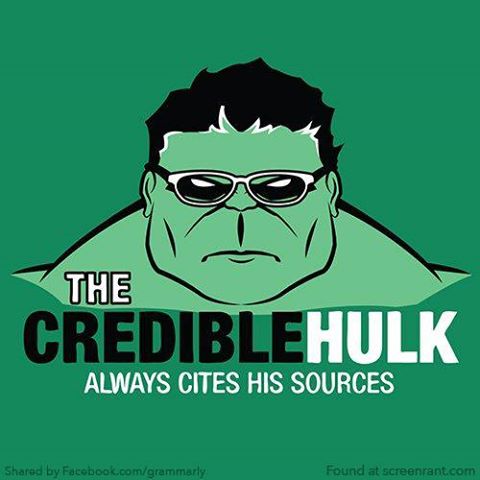
Used with permission
How do I write:
The INTRODUCTION
This paragraph exists for two purposes:
- to make me want to read your paper (and no, just being an English teacher does NOT make me want to spend my time at home reading high school papers.), and
- to set up your paper and tell your reader what it is going to be about.
Let's look at these two things. How do you grab my attention? Well, since attaching $100 bills to your paper is unethical, let's try an approach that actually relies on your writing skills. First you need a "hook" to catch my attention. Consider using these techniques:
- Open with some unusual detail - (Movies like The Avengers and Man of Steel exist today because a man named Frederic Wertham convinced everyone that comic books cause little kids to act violently.)
- Open with a strong statement - (A book about censoring comics books written in the 1950s is the reason that comic book companies were able to sell over $540 million worth of comics in 2014.)
- Open with a quotation - (Frederic Wertham once said, "In comic books life is worth nothing; there is no dignity of a human being."
- Open with an anecdote - (Dwight Clark, comic book store owner, once threw away a comic book he had bought with his allowance money because he was ashamed. His father thought he had wasted his money on something worthless. He now has that same comic book issue in his shop selling for $456.00.)
- Open with a question - ("How does Wonder Woman find her invisible plane?")
Your thesis statement should be somewhere in your introduction. Where? Well, that is up to you. You will probably find it easier (and quite effective) to make it your last sentence. Start broad, get narrower, then hit the reader with your thesis. Typically an introduction paragragh will have 4-7 sentences and either none or just one in-text (it is common to have no in-text in the introduction).
Follow this format - Something interesting - something to focus the thought - the thesis statement
DO NOT:
- SAY, "In this paper..." or "I will prove that...." or anything remotely like that!
- Avoid using a dictionary definition as an interesing hook - that is cliche and makes you sound unoriginal.
- Use one word sentences to grab attention.
- Asking readers to try and do something ("Imagine that you are....)
- Use the phrase, "Since the beginning of time..."
Sample Intro -
In 2012, Americans spent over $20 million on diet books, weight lose drugs, and surgeries to become trimmer ("100 Million"). People are obsessed with loosing weight, but often find themselves right back where they started. This is because people pick diets that they cannot possibly keep for long periods at a time. The key in weight lose is to pick foods that both healthy, but fun to eat, and design the program around that. The all ice cream diet is healthy for people because ice cream has the four main food groups, the individual ingredients are healthy, and there are several case studies where it has worked.
The Body
This is the easy part. In fact, I suggest that you start with your body and write your introduction later. You already have your note cards in order. Now you all you need to do is to look at that first note card and find a way to write that piece of information. Then you can go from there. Don't forget to put in your in-text documentation as you write.
If you listed your topics in your thesis statement, then write your paper in that order.
What Is In-Text Citation and Why Are You Making Me Do This?????
Use this guide if you missed the presentation in class.
First of all, let's address why we are doing it:
This is an easy way of giving credit to your sources. Remember that plagiarism is copying someone's words OR ideas without giving proper credit.
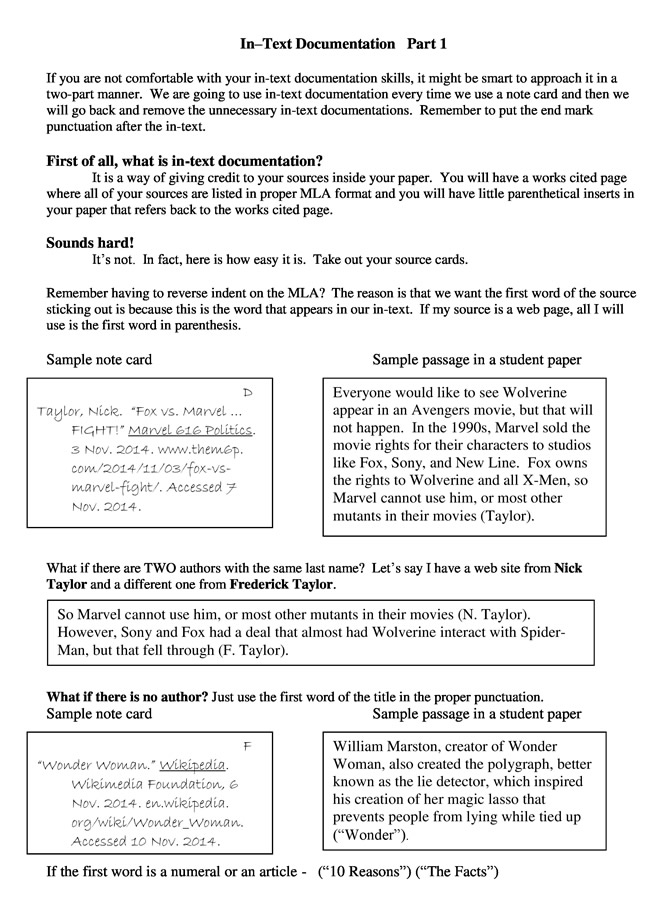
So how do you do it? Simple. Just look at your source cards and follow the pattern to the right. It all depends on the first word of the source.
You can also use this sheet as a helpful guide:
Alford's
Guide to In-Text
Once you finish, you can clean up unneeded in-text by following these guidelines for cleaning up in-text.
Run across something unusual? Check the Purdue Online Writing Center.


Transitions - these help your reader to realize that you are moving from one idea to the next. If you've ever been talking to someone who abruptly changes topic without letting you know that they were now talking about something else, then you understand how annoying a lack of transitions can be.
You can use transition sentences. If I was talking about comic book superheroes and I want to move to the amount of money that comic book movies are making, I could start my next paragraph like this:
"The Incredible Hulk may be super powerful, but that is nothing compared to the power that comic book movies have to make money."
You can also use transition words to alert your
reader. Overusing these can make your writing seem childish and formulaic.
However, using some here or there can add strength to your writing.
Some transition words:
Yet,
However,
Still,
Nevertheless,
On the other hand,
In contrast,
Instead of,
Notwithstanding,
To be exact,
To be specific,
More specifically,
More precisely,
Similarly,
Besides,
Furthermore,
Further,
Moreover,
In addition,
As a result,
For this reason,
Therefore,
Hence,
Consequently,
Accordingly
Other Issues in the body of the paper:
Repetition - this is using the same word too many times, or too closley together. Sometimes you can fix the problem by just choosing a different word and other times you will need to rewrite the sentence.
Example (using different words): change some of the phrases "the death penalty" to "capital punishment" and "execution".
Example (rewrite): While several comic books did have grisly scenes that were inappropriate for young children, many of the comic books mentioned by Fredrick Wertham were not comic books meant for children.
There were several grisly scenes that were inappropriate for young children; however, many of Federick Wertham's examples were from comics aimed toward adults.
Redundancy - this is harder to spot than repetition, although similar. This is when you say the same information using different words. Itis easy to think that you are saying something new, when in fact you are merely repeating yourself.
Example: People have been killed for years and some who were killed were innocent and still got killed because there was not enough evidence to prove them innocent.
Things that weaken your argument:
Too many quotes - the first rule in quoting is to not quote. If you find something that is vitally important to how it is worded, then fine. Otherwise, paraphrase it. Too many quotes makes it seem like you are trying to avoid writing.
Absolutes - rarely do you find something that is "always" this or "never" that. Avoid these types of comments.
Example: In everyone's eyes that is not right and something should be done about it.
Cliches - a cliche is an overused statement. Avoid them like the plague. (See what I did there?)
Example: Guns don't kill people, people kill people.
Exaggerations - Let your facts speak for themselves. Do not overstate them like this student did:
Example: College athletes should be treated like employees instead of slaves.
Formal Writing Rules
Off Limit Words - just get rid of them. All of them.
First person pronouns - I, me, our, my, mine, ours, us, we
Second person pronouns - you, your, y'all
Stupid words - very, nowadays, really, IDK, LOL
Contractions - can't, don't, it's
Phrases - "In this essay", "From my research", "In conclusion", " This is why I..."

The Conclusion
This is the last paragraph of your paper. You wrap up all your ideas in a neat little package. Please do NOT start your conclusion with these words: LASTLY, IN CONCLUSION, or FINALLY. We can see it is the last paragraph. You do not need to insult your reader by telling them that.
You will want to summarize your main points and reassert (note that I did not say restate) your position. Do not end your paper with a question. You can end with a quotation (especially effective if you tie that quotation in with a quotation from the introduction), a prediction, a recommendation, or a reference to something mentioned in the introduction. Here is a great way to do that (borrowed from Mr. Assael): Introductions and Conclusions
PART V - So I finished my rough draft. Now what?
PROOFREAD!!!!!!!!!!!!!!
You can use these sites to help proofread your paper online:
- Turn It In - you need to use this site anyway, might as well get a plagiarism report and a grammar check from it
- Paper Rater - this is an easy to use one, but will overlook a bit. Its' a great place to start.
- Hemmingway - great style checker to look for ways to make your writing flow easier
- Typely - This is an easy to use online editor that will find a variety of issues, not just grammar and spell check.
- Virtual Writing Tutor - It explains your errors in an easy to understand format.
- SlickWrite - just paste your text in and hit the check button. It underlines what may be wrong and if you click it, it will give you suggestions..
- Story Toolz - Has a lot of options, but they are mostly for creative writing - however, it does have a Cliche Buster - get rid of these - it may not be able to do the whole five pages of your paper at one time, though
- Analyze My Writing - has a lot of features that aren't wonderful, but it does do a check on how many times certain words are used - it could save you some points on repetition errors
- Word Counter - another repetition checker

Get rid of the word "very." It is an overused word and you can do better than that. Here are some ways to avoid it:

Clean up your in-text
Go through your paper and get rid of unnecessary in-text. Do it this way:
- Within paragraphs, if you have consecutive cites from the same source that do not have page numbers (i.e. web pages), eliminate all cites but the last one (only within paragraphs)
- For consecutive cites that have the same page number, eliminate all but the last one (within paragraphs)
- For consecutive cites that have different page numbers, eliminate all but the page number on all but the first one (this extends into other paragraphs)
Here is an example (swiped from wikipedia.org). All red and crossed out cites or words need to be eliminated.
The Loch Ness Monster, sometimes called Nessie or
Ness (Smith 56),
is a mysterious and unidentified animal or group of animals claimed by
some to inhabit Loch Ness, a large deep freshwater loch near the city
of Inverness in northern Scotland. Nessie is usually categorized as a
type of lake monster (Smith 56).
Its disputed "scientific" name, as chosen by the late Sir Peter
Scott, is Nessiteras rhombopteryx (Smith
35). Although no evidence exists to suggest
the alleged creature's gender, the nickname "Nessie" sounds
feminine, so the creature is often referred to as female (Brown
37).
Along with Bigfoot and the Abominable Snowman, Nessie is one of the best-known
mysteries of cryptozoology (Brown
48). Most scientists and other experts
find current evidence supporting Nessie unpersuasive, and regard the occasional
reports of sightings as hoaxes or misidentification of mundane creatures
or natural phenomena (“Creature…”).
However, belief in the animal persists among many people around the world,
with the most popular theory being that it is a plesiosaur (“Creature…”).
Some have argued a history of "monster"
sightings in the loch provides circumstantial evidence supporting the
creature's existence. Note that the validity and origins of these stories
have been challenged, along with any "history" predating the
early 1930s. There have been around 10,000 such sightings, a third of
which were reported in one form of media or another (“Creature…”).
You can following these guidelines for cleaning up your in-text.
Check your sources
Go through your paper and put a checkmark on your Works Cited page beside every entry that has an in-text. This will prevent you from getting the penalty for a source in-texted that is not on the Works Cited page or having a source on the Works Cited page that is not in-texted in the paper.
Page numbering
Click INSERT then choose PAGE NUMBERS. Put the page number in the top right corner.
USE THE FINAL CHECK OFF LIST
Part VI - Submitting the Paper
To turn in your paper, you must submit a physical copy of the paper to Mr. Alford AND complete the two online tasks as well.
What to Put in Your Envelope
- Note Cards (all of them)
- Source Cards (all of them)
- Rubric
- Final Copy (duh! - you'd be surprised...)
- Red Pen (optional)
- M&Ms (well, not really, but it would be a nice gesture...)
Also:
- Paper is submitted to Turn It In on the day it is due (or after)
- Google Doc is shared with Mr. Alford givign him editing rights

The Signo 207 Uni Ball - A pen well worth the full 5 extra points


You won't believe that this is true, but the following is an actual e-mail from a former student who was in college at the time of this letter. This has no alterations to make me look good (I look good enough as is). So read this and then keep your handouts where you can get them.
Lord Alford!
Guess who it is??!! Your FAVORITE former student
Adrian. I'd just like to take the time to thank you so much for giving
us a research paper. I'd be lost already if I hadn't have used MLA and
all that fun stuff.
My teacher tells us to research MLA in our handbook, but guess where I
go to research MLA?????? That's right, Alford's guide to MLA Bliss is
the best!!! I hope everything is going well for you, and tell your students
I say that they are fortunate to have the best English teacher who gives
a solid research paper assignment.
Talk to you soon
Adrian
Thanks Adrian!